가닥 GADAK
한국어 Download

An agent for long LLM conversations

Keep the thread
of long chats.

Work with an LLM long enough and the questions, decisions and files sink into the scroll. Gadak redraws the conversation as a transit map and tells you first about what slipped past.

Holding on toa question that wandered off

Free · macOS and Windows · v0.1.0

Why it exists

A chat piles up in one line. Work branches.

You talk, wander off on a side question, come back, decide, and the same file changes three times. Scrolling alone will not tell you where you decided something or what you left out.

As a chat

  • I want a bot that alerts me on exchange rates
  • How is polling different from a webhook?
  • Polling it is, then
  • Compare with my target and send an alert
  • Just change the threshold to 1,380

One column, top to bottom. A decision looks the same as a detour.

As a Gadak map

The main line and the side trip split apart. You can see what was decided and where you are.

What Gadak does

It reads, sorts, and speaks up about what you missed.

Gadak stays beside the conversation. It never answers for the model. It draws the flow.

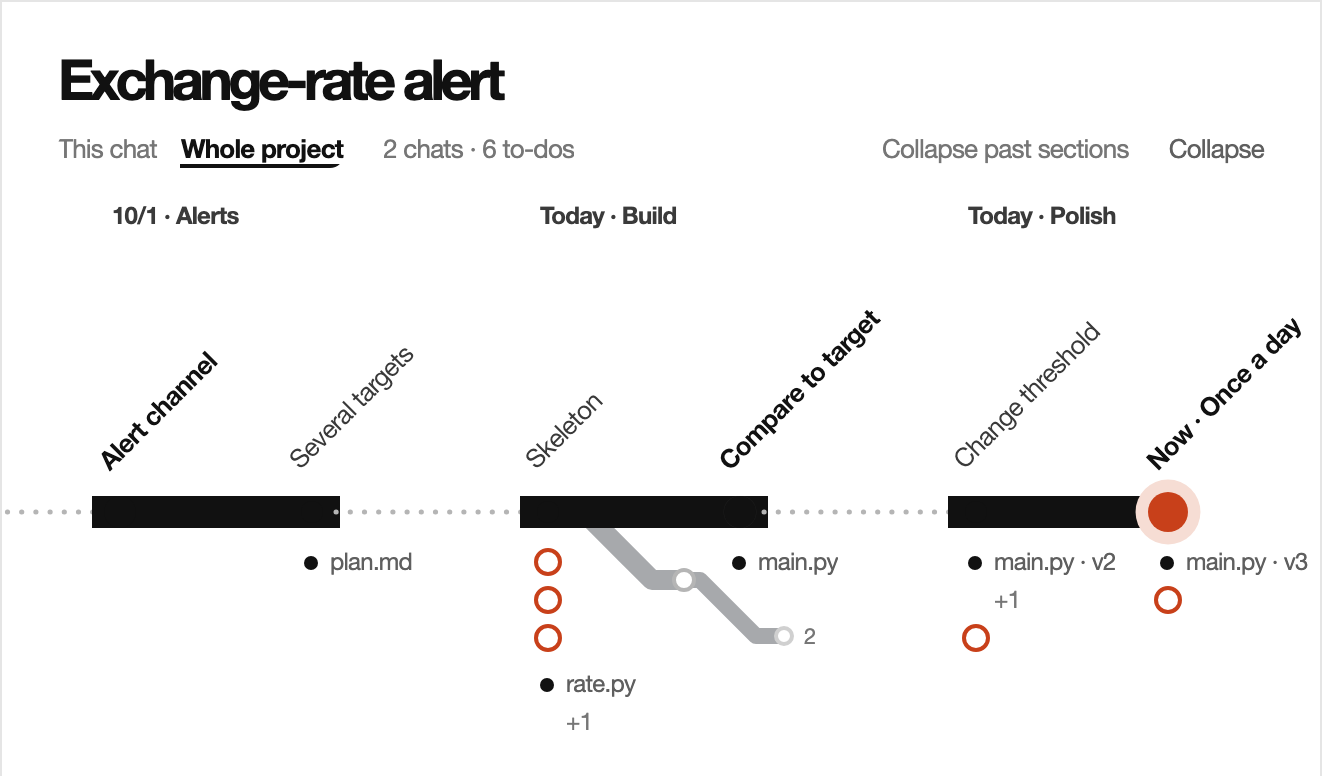
One question is one station. A decision is a large dot with a bold name, a side trip is a grey branch that drops below the line, and a red dot shows where you are. Click a station to jump to that moment.

The route card in the Gadak window: a made-up project drawn as a main line with a side trip, a decided station and the current station.

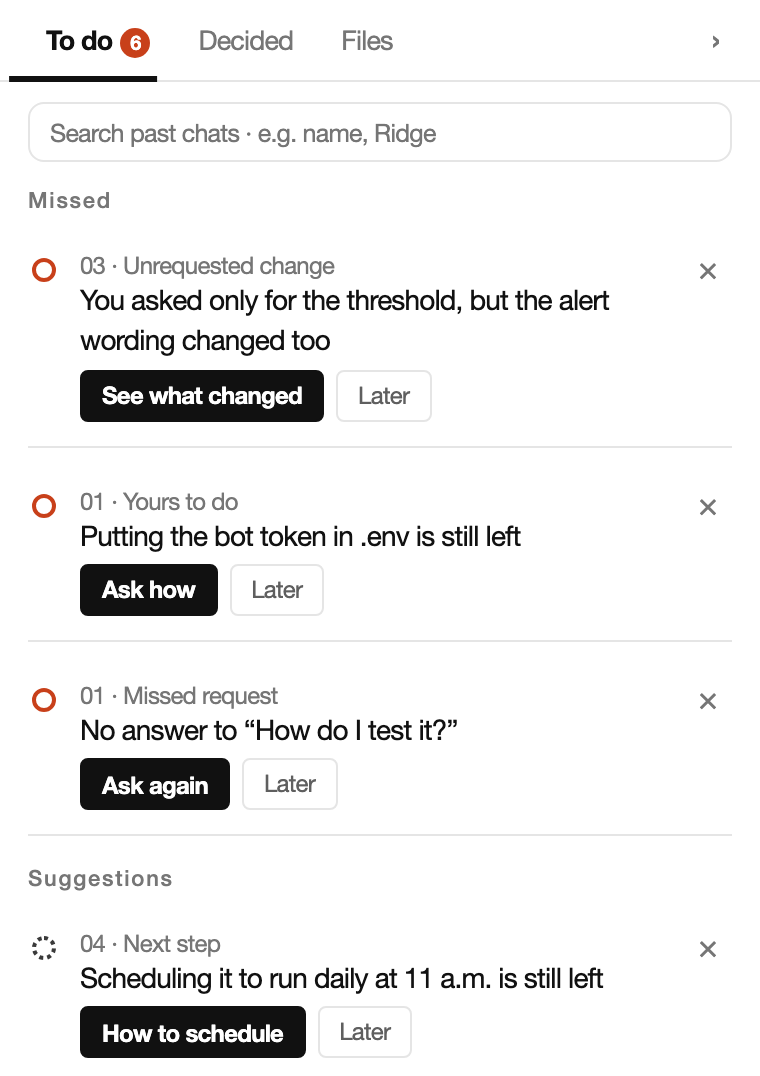
A file that changed without being asked, a request that never got an answer, the context to carry into a new chat. Gadak rereads the record, lists only what it could verify, and keeps a trace of how it decided.

The to-do list in the Gadak window, with items for an unrequested change, something left for you to do, and a missed request.

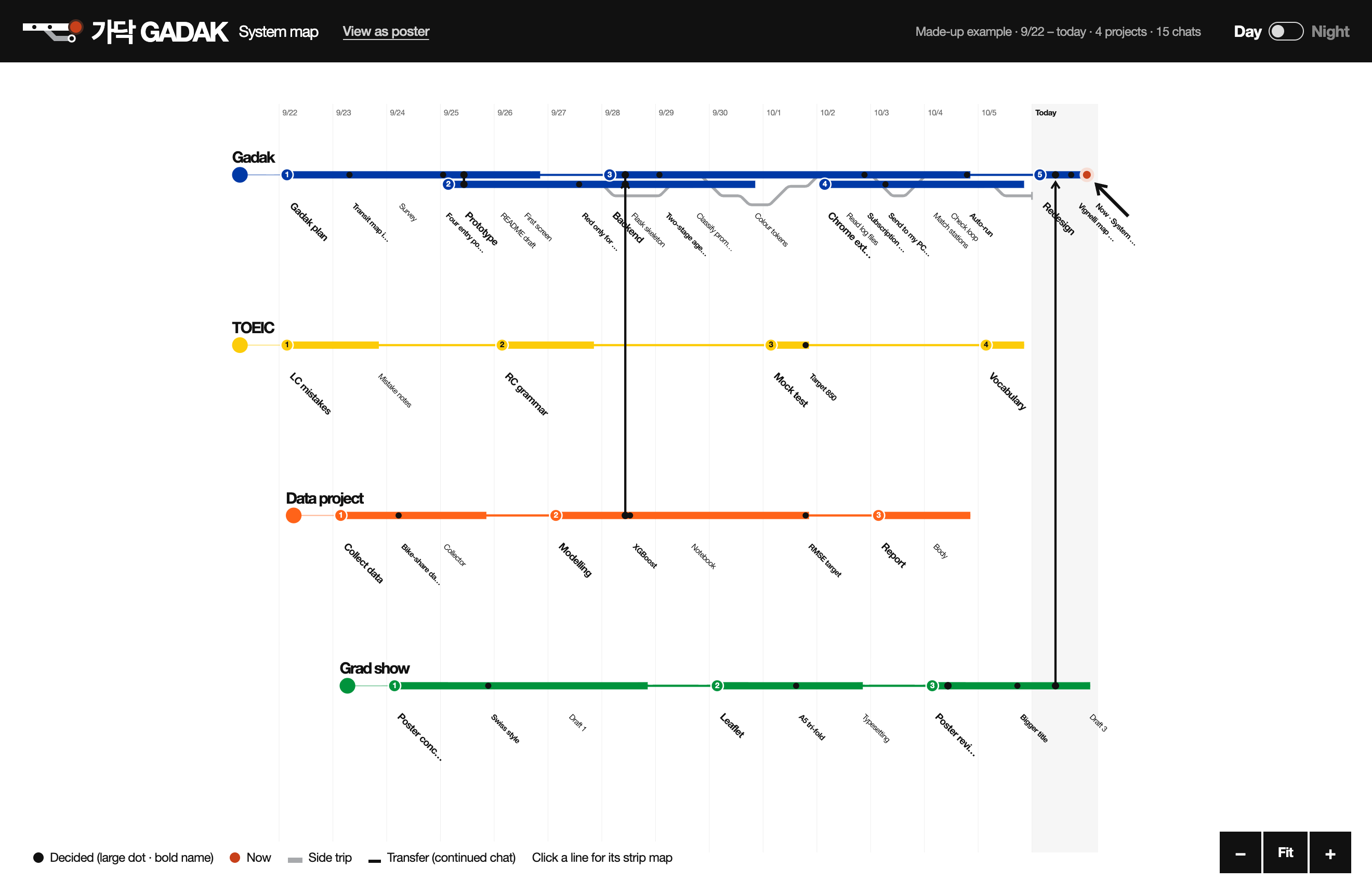
Every project is a line with its own colour, laid over the last 7, 15 or 30 days. Conversations that continue each other are joined as transfers, and clicking a line opens its strip map.

The Gadak system map: four projects drawn as blue, yellow, orange and green lines over a row of dates.

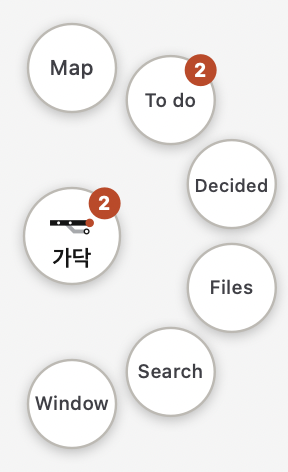
On a Mac, a Gadak button rests at the edge of the screen. Click it and the map of your current conversation appears over whatever you are working in, with small buttons for to-dos, decisions and files. You choose which buttons it shows.

The Gadak button at the screen edge with six small buttons fanned around it.

Press Look ahead and Gadak reads what you are trying to do, searches your past records and the documents in your working folder, and offers up to three ways forward. They are questions to take to your LLM, not answers. A path with nothing found behind it is not offered.

Private and in your hands

Your chats stay on your computer. Sending stays with you.

Conversations are stored on your computer

What Gadak reads lives only in the .gadak folder on this machine. Only while sorting does a slice of that turn (the start of the question, the ends of the answer, the names and line counts of changed files) go to the AI you connected. API keys are kept only in the macOS Keychain or Windows Credential Manager.
Gadak does not answer

There is no chat box in Gadak. It prepares what to say and hands it to you; you send it. Only the two kinds you switch on (undoing an unrequested change, and a summary to carry on) are sent by Gadak itself.

Try it now

Click around before you install.

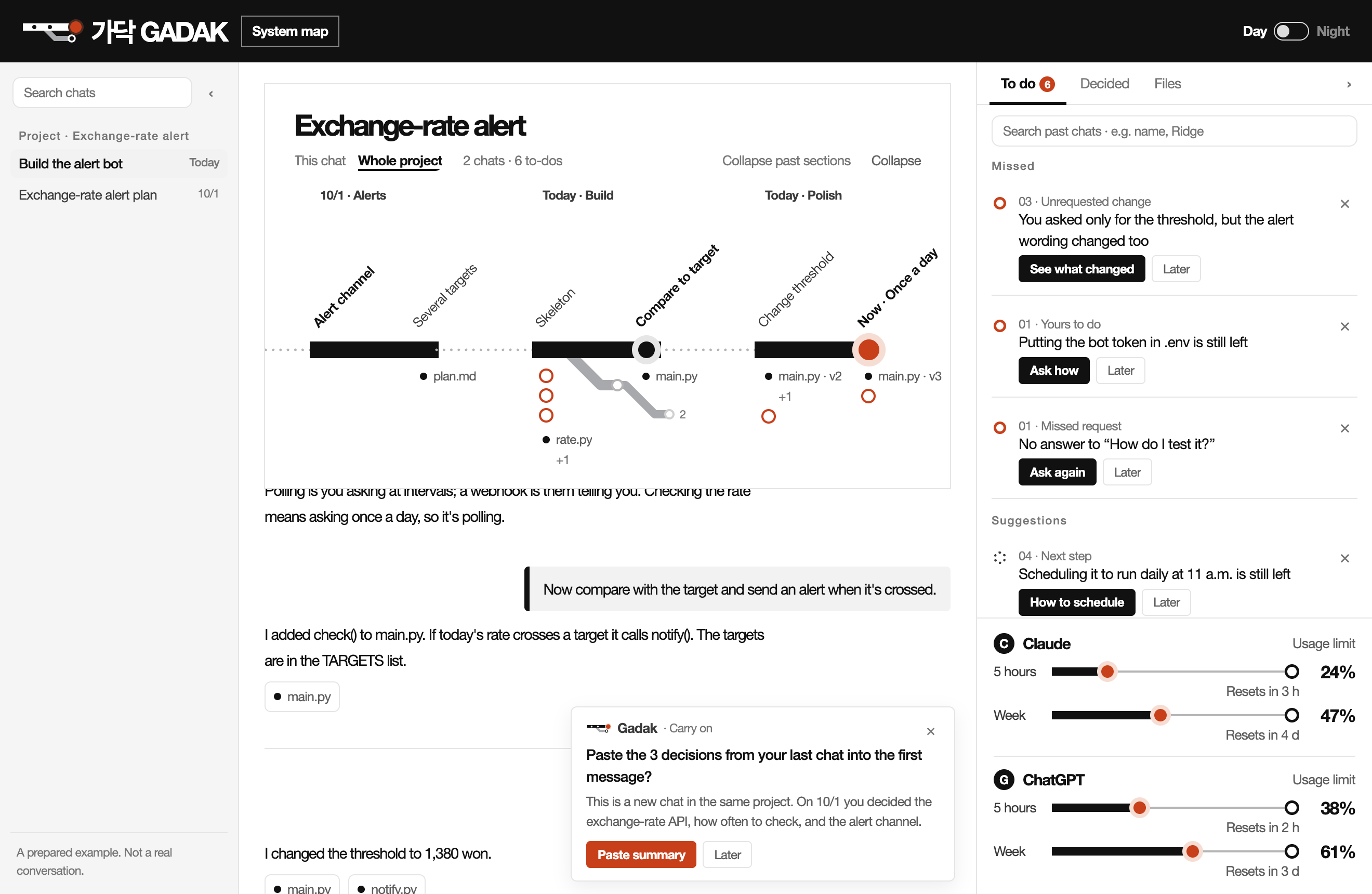
This is the real Gadak window running on a made-up conversation about an exchange-rate alert bot. Click a station, work through the to-dos, open the system map.

Gadak window demoOpen full screen ↗
The whole Gadak window: conversations on the left, the map and the chat in the middle, to-dos on the right.

The demo is laid out for a wide screen. Open it on a computer to click around.

A prepared example. Not a real conversation.

Three stops

Leave it on and it reads by itself.

  1. Install

    On a Mac, drag Gadak from the disk image into Applications. On Windows, open the installer. No Python, no terminal.

  2. Connect an AI

    Pick one AI for the sorting: a Claude subscription, a ChatGPT subscription, or an LLM API key (Anthropic, OpenAI or Gemini).

  3. Leave it on

    Gadak finds the Claude Code and Codex conversations on this computer and sorts the one you are looking at first. Web chats on Claude and ChatGPT are read through a Chrome extension.

Tokens and cost

Gadak added about 2⁠–⁠3% to what I already used.

Gadak sorts your conversations with the AI you connect. Sorting runs on a small, cheap model, and a large model is used only when you press Look ahead. These are the makers' own measurements.

2–3%Added by Gadak on top of my Claude usage7–12 Oct · one maker's real records
About 1¢One automatic sorting passClassifying, checking, sectioning and summarising together
6–17¢One Look aheadRuns only when you press it

What it took to sort one conversation · measured on a real 55-turn chat

Small model (Haiku)What Gadak uses for sorting · range over four runsLarge model (Sonnet)One run, for comparison
Input tokens68,000 – 95,00068,000
Output tokens13,000 – 18,00018,000
Calls to the AI12 – 149
Time taken2 – 5 min4 min
At API prices$0.19 – 0.24 · 0.3–0.5¢ per turn$0.34
ResultFinds six or seven side trips out of tenNo better. It finds every side trip but calls twice as many turns a side trip
  • With a subscription nothing extra is charged; Gadak shares that plan's limit. With an API key the usage is billed to that key.
  • Look ahead uses about 0.7% of a Claude Pro five-hour limit per spot. Left to run by itself it would take about 4% for one 58-turn conversation, so automatic scouting is off by default.
  • Importing past chats in bulk costs in proportion. Sorting 90 days of chats (35 conversations, 408 turns) came to $2.41 at API prices and took about 40 minutes. On a subscription it stopped at 97% of the five-hour limit.
  • Every call Gadak makes is logged with its token count on your own computer. Nothing is sent to a server.

Costs are converted at Anthropic API prices. They come from one conversation and one person's records, so they vary with the length of your chats and the model you choose. See the measurement records (GitHub)

The whole Gadak window: conversations on the left, the map and the chat in the middle, to-dos on the right.

Get Gadak

The Gadak for your computer

It is free. The first launch needs one confirmation, and the download page shows how.

Other computers · first launch →

v0.1.0 · 13 Oct 2026

Questions

Before you download

Is it free?

Yes. Gadak is a free app made as a class project, and the code is public on GitHub. For the sorting it uses the subscription or API key you already have, so what Gadak uses counts against that plan's limit or that key's bill.

Which conversations does it read?

Claude Code and Codex conversations are read automatically while Gadak is on. Web chats on Claude and ChatGPT are read once you add the Chrome extension, and past conversations can be brought in at once from an export file. Cursor connects with one click on a Mac. ChatGPT on the web, Cursor and export files have not been verified end to end in real use yet. Chats in the desktop and mobile apps cannot be read directly.

Where do my conversations go?

The full text is stored only on your computer. While sorting, the start of that turn's question, the ends of the answer, and the names and line counts of changed files go to the company behind the AI you connected. A turn being checked for missed work sends a little more. The app you download here sends no usage records to the Gadak team.

Which AI do I need?

One of these: a Claude subscription (Pro or Max), a ChatGPT subscription (Plus or Pro), or an LLM API key (Anthropic, OpenAI or Gemini). Choose it under Connect AI in the Gadak window. Without one, Gadak only reads and shows your conversations.

I get a warning on first launch

Gadak is a class project and has no paid signature from Apple or Microsoft, so the first launch needs one confirmation. On a Mac: System Settings → Privacy & Security → Open Anyway. On Windows: More info → Run anyway. You can check the file against the SHA-256 values on the download page.

What is different on Windows?

The Windows version is a first release. The makers have no Windows PC, so it was checked only under Wine on a Mac and has not been run on a real PC yet. The floating button, the one-click setup that fetches Claude Code or Codex for you, the Cursor connection with auto-send, and the Claude usage gauge are not there yet.

How far can I trust the sorting?

An AI does the sorting, so it can be wrong. In the conversation we measured it found six or seven side trips out of ten, and the Decided mark still wavers between runs. That is why a to-do appears only when Gadak has checked the evidence itself, and why it keeps a record of what it looked at.

How do I remove it?

On a Mac, move Gadak from Applications to the Trash. On Windows, uninstall it under Settings → Apps. To delete the conversations it read as well, remove the .gadak folder in your home folder.